
Use Claude with Chrome
Some prompts in this collection, notably Set up Google Analytics, rely on Claude’s ability to to operate a real web UI on your behalf. For these to work, Claude needs to be connected to Chrome.
Prerequisites
The Claude for Chrome extension installed in Google Chrome.
A paid Claude plan that includes Claude Code; the extension is currently gated to paid tiers.
Logged-in access in that same Chrome profile to whatever the prompt drives (in the GA4 case, your Google Analytics account).
Anthropic’s docs
Product page and install link: https://claude.com/claude-for-chrome
Getting started guide (install, permissions, first run): https://support.claude.com/en/articles/12012173-getting-started-with-claude-for-chrome
Running the prompts
GUI
Open Chrome with the Claude extension installed and signed in.
Open the target site in a tab and confirm you’re logged in.
Open the Claude side panel, paste the prompt, and let Claude take over:
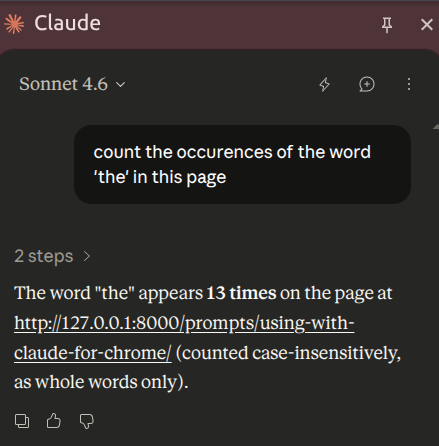
Watch the first few actions; the extension asks for confirmation on sensitive steps, and you can stop it at any point.
CLI
Alternatively, you can run claude --chrome
and paste the prompt in the terminal UI.